TULPAR

Security & Audit

Every Change Recorded, Every Record Provable

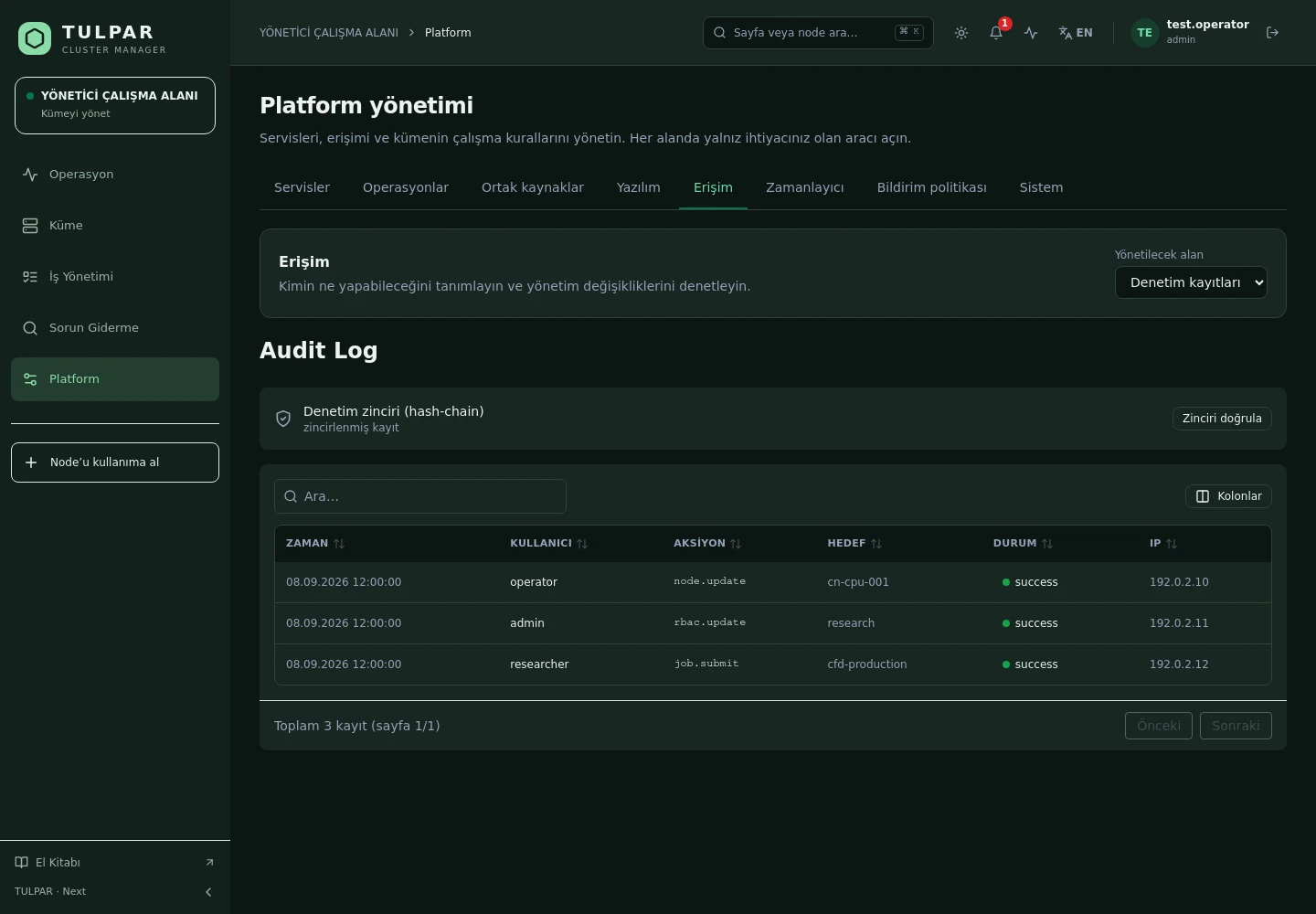
Every mutation made in the panel is written to the audit log automatically; records are chained with SHA-256 and their integrity is verified in one click.

Automatic auditing

Keeping records isn't left to a developer remembering — middleware captures every mutation.

Provable integrity

Chain verification reports the sequence number of the first broken record — silent tampering is not possible.

TULPAR / Security & Audit
Security & Audit
Current TULPAR interface in Turkish · Sample test data

What's Inside

A Management Panel That Is Secure by Default

Security isn't a module added later; it's a design decision applied at every layer.

01

Audit Log

Who, when, against which resource, with what result — records are filtered and searched from the panel.

02

Hash-Chain Integrity

Each record carries the hash of the one before it; the whole chain is verified from one end.

03

Secret Management

Secrets live in a single source with restricted file permissions; tokens and passwords are never logged and query strings are masked.

04

Command Allowlist

System commands run through an allowlist of permitted binaries with timeouts, never a free shell.

05

Hardening

Rate limiting, security headers, HSTS and a strict cookie policy in production are on by default.

06

Least Privilege

An mTLS agent channel, a read-only Docker socket proxy and an unprivileged slurmrestd — each component holds only the rights it needs.

TULPAR / Security & Audit

What Makes a Panel Auditable

An audit trail exists to prove what happened, not to produce a report after the fact.
Chained records
Audit events are appended to a SHA-256 hash chain in a separate integrity module; appends are atomic and any retroactive edit breaks the chain visibly.
Denials are recorded too
Rejected unauthorized requests are written alongside successful operations — access attempts become visible.
Machine identities kept apart
Agent enrollment, heartbeats, node discovery and metric ingestion are each protected by their own token or mTLS certificate; none can stand in for another.
Leak-proof export
When a configuration bundle is exported, secrets are redacted and the guard is fail-closed — a bundle never carries a secret by accident.
Security & Audit
What Makes a Panel Auditable
Current TULPAR interface in Turkish · Sample test data

GOOD TO KNOW

Frequently Asked Questions

Got questions? Everything you need to know about installation, licensing and scaling is here.

How is TULPAR licensed?
TULPAR is an enterprise product offered under a commercial license. Licensing is annual, based on your cluster scale and the support coverage you need; every license includes the full feature set — there is no feature gating. Contact us through the contact page for a quote.
How long does installation take and what do I need?
An EL9-based head server is enough. tulpar-preflight.sh prepares the prerequisites, install.sh brings up the whole stack; you then enter the admin password, NTP, LDAP and SLURM settings in the web wizard. A typical installation completes in minutes.
Does it work with my existing Slurm cluster?
TULPAR talks to Slurm over the slurmrestd REST API and falls back to the CLI automatically, providing a stable, version-independent interface. Head Slurm components run natively on the host (dnf/systemd) and share the same repository and version as the compute nodes.
Can it be installed in an air-gapped environment without internet access?
Yes. RPM repositories travel with the product, the Slurm package repository can be imported as a GPG-signed offline bundle, and container images are loaded with docker load. Every component works on a closed network, including node installation, monitoring and central logging.

READY FOR YOUR NEXT COMPUTATION

Unleash your
infrastructure’s potential.

Let’s explore what TULPAR can do for your cluster.

Request a demo